
Import your transactions from one CSV
Bring your transactions together in one CSV. ThaiTax imports them and syncs everything to Xero, so your books and tax documents use the same data.
Turn your Xero transactions into VAT reports, withholding tax certificates and files for Thailand’s Revenue Department. Built for businesses and accountants.
PP 30 VAT reports50 Tawi certificatesPND 3 / 53 files
 App Partner
Keep your bookkeeping in Xero. Use the same records to prepare your VAT reports, withholding tax certificates and PND 3 / 53 files.
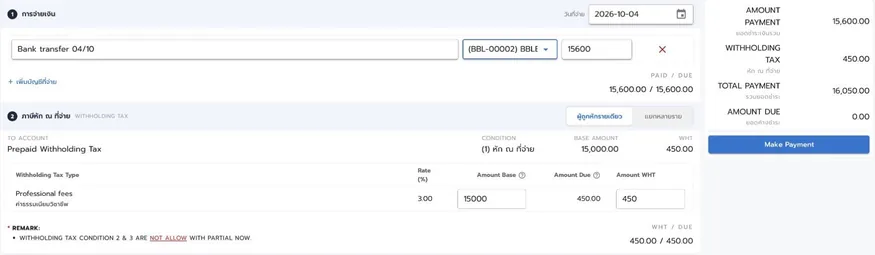
Pay a supplier and the 50 Tawi certificate is created for you, in the Revenue Department format, ready to send.
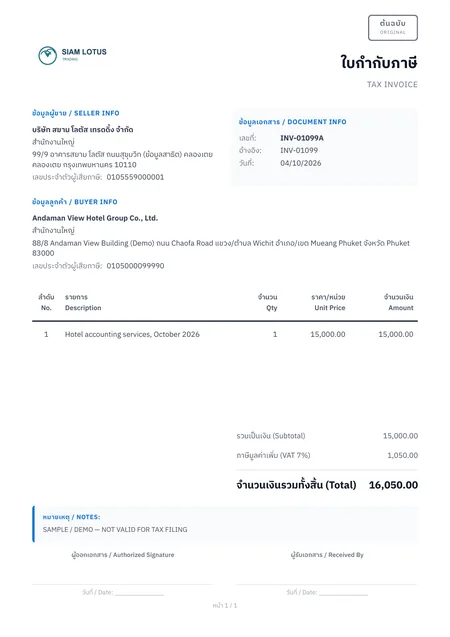
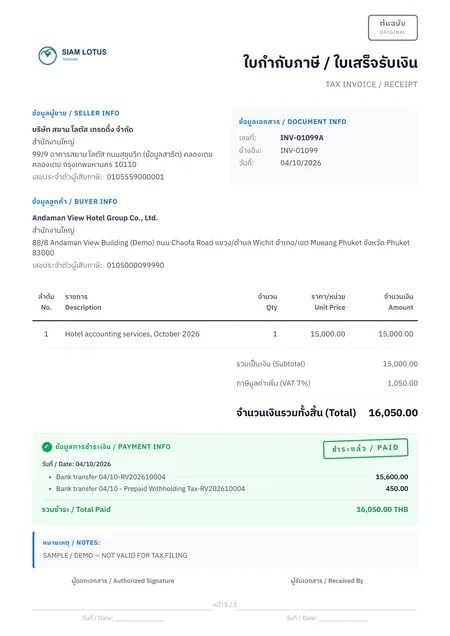
Thai and English tax invoices generated from the same record, so your Thai customers and your overseas head office both get what they need.
Do it yourself, or let Plizz’s accountants run your books and filings in the same system.
Connect each client’s Xero organisation and switch between them in a click. Unlimited users for your whole team.
VAT reports for PP 30, 50 Tawi certificates and PND 3 / 53 TXT files come straight from each client’s books. Process the TXT files in RD Prep, then upload them to e-Filing.
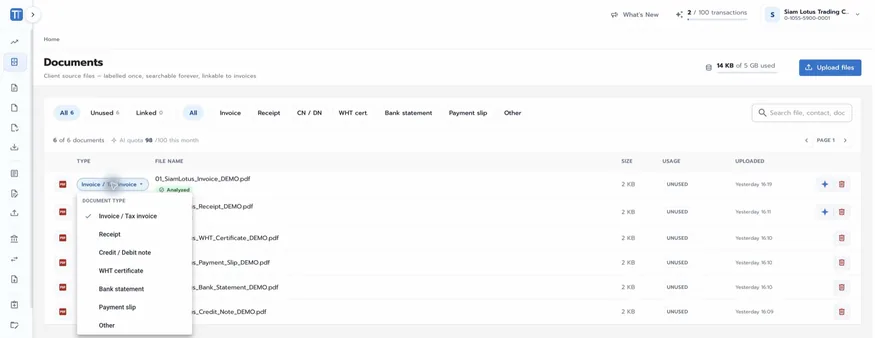
AI turns supplier invoices and receipts into draft accounting entries. Your team checks and confirms each one before it is booked.
From ฿999 down to ฿499 per organisation per month, with one month free on the yearly plan at every tier.
ThaiTax is a Xero App Partner, with an integration certified by Xero.
“good!! withholding tax certificate generates automatic after record payment”
ดีมาก!! หนังสือรับรองการหักภาษี ณ ที่จ่ายสร้างให้อัตโนมัติหลังบันทึกการจ่ายเงิน
“Easier for WHT certificated issuing and recording account transactions”
ออกหนังสือรับรองการหักภาษี ณ ที่จ่ายและบันทึกรายการบัญชีได้ง่ายขึ้น
“It is the user friendly system. The package is reasonable”
เป็นระบบที่ใช้งานง่าย ราคาแพ็กเกจสมเหตุสมผล





Xero is a great accounting platform, but it does not produce Thai tax documents. Plizz, an accounting firm in Bangkok, built ThaiTax to fill that gap: your books stay in Xero, and ThaiTax adds the withholding tax certificates, VAT reports and monthly returns the Revenue Department expects.
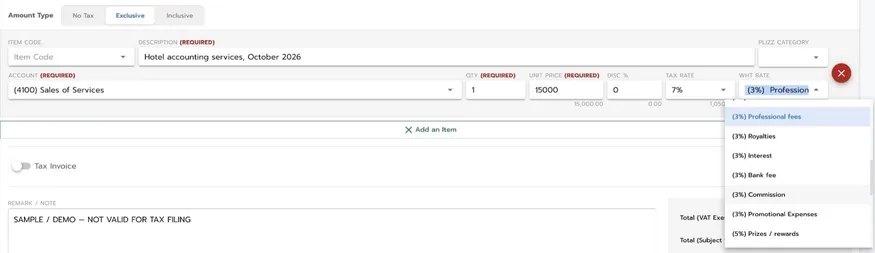
Multiple VAT and withholding tax rates, different tax points for services and goods, and undue input and output VAT kept apart from your tax liability.
Book in Xero or in ThaiTax. Invoices, bills, manual journals, contacts, chart of accounts and tracking categories stay in sync in real time.
Designed by the Plizz team around the monthly work of a Thai accounting firm, with unlimited users for every organisation.
Create your account at app.thaitax.co, or sign in with your Xero account. The 14-day trial needs no credit card.
Choose the Xero organisations to connect. Historical data syncs at sign-up, then the current period syncs both ways automatically. Managing several companies or clients? Switch between them from one account.
Book in Xero or ThaiTax, import a CSV, or turn PDFs into draft entries with AI. Then generate VAT reports for PP 30, 50 Tawi certificates and PND 3 / 53 files.
Get your data in three ways, and prepare your monthly tax documents from it. The screens below come from a demo company with sample data.
Bring your transactions together in one CSV. ThaiTax imports them and syncs everything to Xero, so your books and tax documents use the same data.
Upload an invoice or receipt. AI analyses it and drafts the entry, and you check and confirm the details before anything is booked.
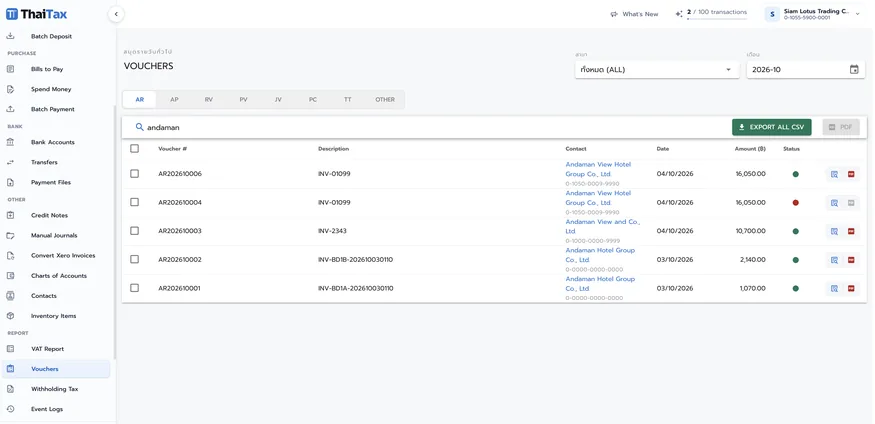
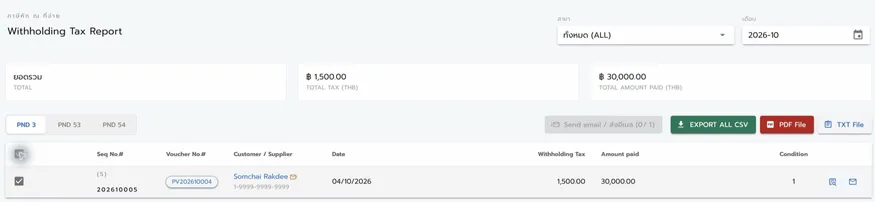
Generate VAT reports for your PP 30 return, 50 Tawi withholding tax certificates in the Revenue Department form, and PND 3 / 53 export files.
RD Prep is the Revenue Department’s free program that converts your withholding tax data into files you can submit online through e-Filing.
Pay per connected organisation. One organisation means one connected company in Xero. The rate drops as you add organisations, and paying yearly gives you one month free at every tier.
Save ฿999 per organisation every year
฿10,989 total / year for 1 organisation
Start your free trial14 days free, no credit card. Choose monthly or yearly when the trial ends.
Prices exclude 7% VAT. Your Xero subscription is billed separately by Xero.
Plizz, the Bangkok accounting firm that built ThaiTax, can do it for you.
Plizz’s accounting team manages your books in Xero and handles your monthly Thai tax filings with ThaiTax.
Talk to our teamPlizz sets up Xero and ThaiTax for you, then takes care of bookkeeping and monthly filings from day one.
Talk to our teamDoing it yourself but new to Xero? Open a Xero account first, then connect it to ThaiTax. Try Xero for freeAbout Plizz accounting services
Yes, for now. ThaiTax connects to your organisation in Xero, or to each client’s, and data you import by CSV syncs to Xero. A standalone version is planned for 2027, with an open API for other accounting software.
Transaction vouchers, input and output VAT reports for PP 30, withholding tax certificates (50 Tawi) following the Revenue Department form, and PND 3 / 53 files for RD Prep.
RD Prep is a free program from the Revenue Department. It checks your withholding tax data and converts it into the official format, so you can submit PND 3 and PND 53 online through e-Filing instead of keying every line by hand. ThaiTax produces the files RD Prep imports.
You file through the Revenue Department’s e-Filing website, and ThaiTax prepares what you need. For the PP 30 VAT return, use the totals from your ThaiTax VAT report to complete the return on e-Filing. For PND 3 and PND 53, process the ThaiTax export files in RD Prep, then upload them to e-Filing.
No. AI reads the PDF and prepares a draft. Your team reviews and confirms every entry before it is booked.
You get 14 days with all features. No credit card is required to start.
Per connected organisation. Monthly rates go from ฿999 down to ฿499 per organisation as you add organisations, and yearly billing gives you one month free. Users and transactions are unlimited. Prices exclude 7% VAT.
Connect your Xero organisations and ThaiTax brings in your history, then keeps invoices, bills, manual journals, contacts, chart of accounts and tracking categories in sync. Before your first filing, review your Thai tax settings such as withholding tax types and bank accounts. If you prefer, Plizz can set everything up for you.
ThaiTax is billed by Plizz (Thailand) Co., Ltd. for each connected organisation, every month or once a year on the yearly plan. For a question about an invoice or your subscription, choose “Billing or subscription” in the contact form or email thaitax@plizz.co.
Use the contact form and choose “I am a customer and need support”, or email thaitax@plizz.co with your organisation name and a screenshot of the issue.
Of course. Use the Talk to our team form at the bottom of this page, email thaitax@plizz.co or call +66 2 821 5100, and our team will walk you through ThaiTax.
Today ThaiTax works with Xero. A standalone version is planned for 2027, along with an open API to connect other accounting software. Tell us which software you use and we will build the most requested connections first.
Free for 14 days. No credit card required. Connect the Xero organisations you already manage.